Touch, keyboard, and accessibility controls
Choose the control that suits the player: direct touch, a mouse, or keyboard controls. Matching supports selecting an object and then its destination.
Worked example
Use Tab to move between controls and Enter or Space to activate a focused button. A visible outline shows the current focus.
Try it step by step
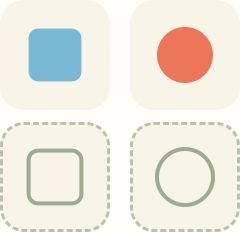
- Shape Sorter
Tap a shape, then its matching outline. You can also drag it.
- Garden Maze
Help the little explorer reach the star. Trace the open path with your finger, tap the arrows, or use your arrow keys.
- Free Drawing
Pick a tool and draw something wonderful.
A useful hint
Use the permanent Sound button to mute. Reduced-motion preferences limit decorative animation; activity-specific controls explain alternatives below the game.
Simple activities, gentle encouragement, and room to explore at your own pace. Big buttons and simple controls on phones, tablets, and computers.
Games to practise
Shape Sorter
Find a cozy home for every colorful shape.
Garden Maze
Follow a winding path to a shiny little star.
Free Drawing
A big blank page for your biggest little ideas.
Round Things
Round Things. Notice curved outlines and distinguish them from corners. Three levels to explore at your own pace.
Little Traffic Lights
Little Traffic Lights. Connect a traffic signal with a safe movement. Three levels to explore at your own pace.
Empty and Full
Empty and Full. Notice empty, half-full, and full containers. Three levels to explore at your own pace.
Soft or Hard
Soft or Hard. Compare familiar material properties with a grown-up. Three levels to explore at your own pace.